Installing PageMotor on Bluehost
A plain-English walkthrough. About ten minutes, and you do not need to be technical.
Not on Bluehost? Everything in this guide is standard cPanel, so the steps are the same on any cPanel host. The screens may be laid out a little differently, but the names you need, like File Manager and MySQL Databases, are the same. We also have this guide for HostGator and GoDaddy, and a different one for SiteGround (which does not use cPanel).
Use this guide with any AI assistant
Download it as a prompt file, paste it into Claude, ChatGPT, Gemini or any LLM, and it will walk you through every step interactively.
▶ The whole install in 4 minutes 20 seconds, narrated, with captions. Standard cPanel throughout, so it follows along on most cPanel hosts; the steps below carry the Bluehost specifics.
Read the narration instead
Preflight. Upload pm-preflight.php into the folder you are about to install into and open it. It reports the PHP version, missing extensions, whether PHP can write config.php for you, and whether the files landed in the right place. Then delete it.
Step one. cPanel › File Manager › your site folder. Upload the PageMotor zip, right-click it, Extract. You should see pagemotor.php, a lib folder and config-sample.php. If you got a single folder called pagemotor instead, move everything inside it up into the site folder.
Step two. cPanel offers two routes to the same job: the MySQL Databases page in three stages, or the MySQL Database Wizard one screen at a time. Which you see depends on your host. Either way you end up holding a database name, a username and a password.
The prefix. cPanel puts your account name on the front of both the database and the user, so pagemotor is saved as something like theaccount_pagemotor. Copy the full names exactly as cPanel shows them. Getting this wrong is the most common reason the install fails at the last step.
Step three. Rename config-sample.php to exactly config.php: that rename is what switches PageMotor on. On current releases you can instead go straight to /admin/ and let the install wizard write the file. A blank white page there is not an error, only a download that predates the wizard.
By hand, change three values and nothing else: DB_NAME, DB_USER, DB_PASSWORD, with the prefixed names. DB_HOST stays localhost.
Step four. Open /admin/ first, before anything else. PageMotor sets itself up and walks you into creating your admin user.
If it fails. A 500 or blank page is almost always config.php: wrong name, wrong folder, or never renamed. “MySQLi Connection Error” is good news, because config.php is working and PageMotor reached the database: re-check the prefixed names, the password and ALL PRIVILEGES.
pm-preflight.php,
upload it into the same folder you are about to install into, then open
yourdomain.com/pm-preflight.php in your browser. It tells you in plain English
whether this host can run PageMotor: the PHP version, any missing extensions, whether PHP can
write config.php for you, and whether the files landed in the right folder. It is
read-only, it never asks for a password, and it is deliberately written to run even on very old
PHP, so it reports an out-of-date PHP version instead of failing silently on it. Delete the file
once you have read the report.
1Put PageMotor on your site
- In Bluehost, open cPanel and click File Manager.
- Open the folder for your site. It is usually
public_html, orpublic_html/yourdomain.comif you have more than one site. - Click Upload, choose your PageMotor
.zip, and wait for it to finish. - Back in File Manager, right-click the uploaded zip and choose Extract.
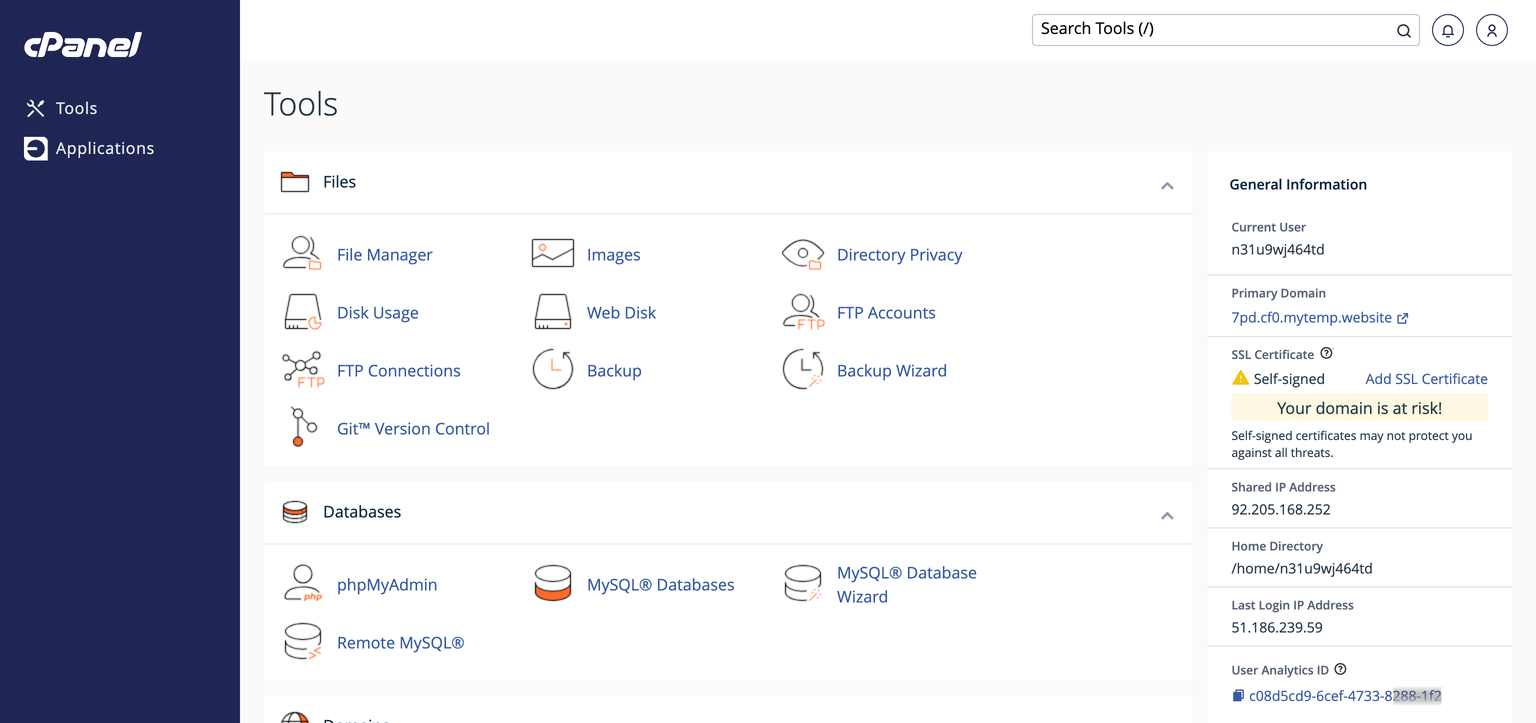
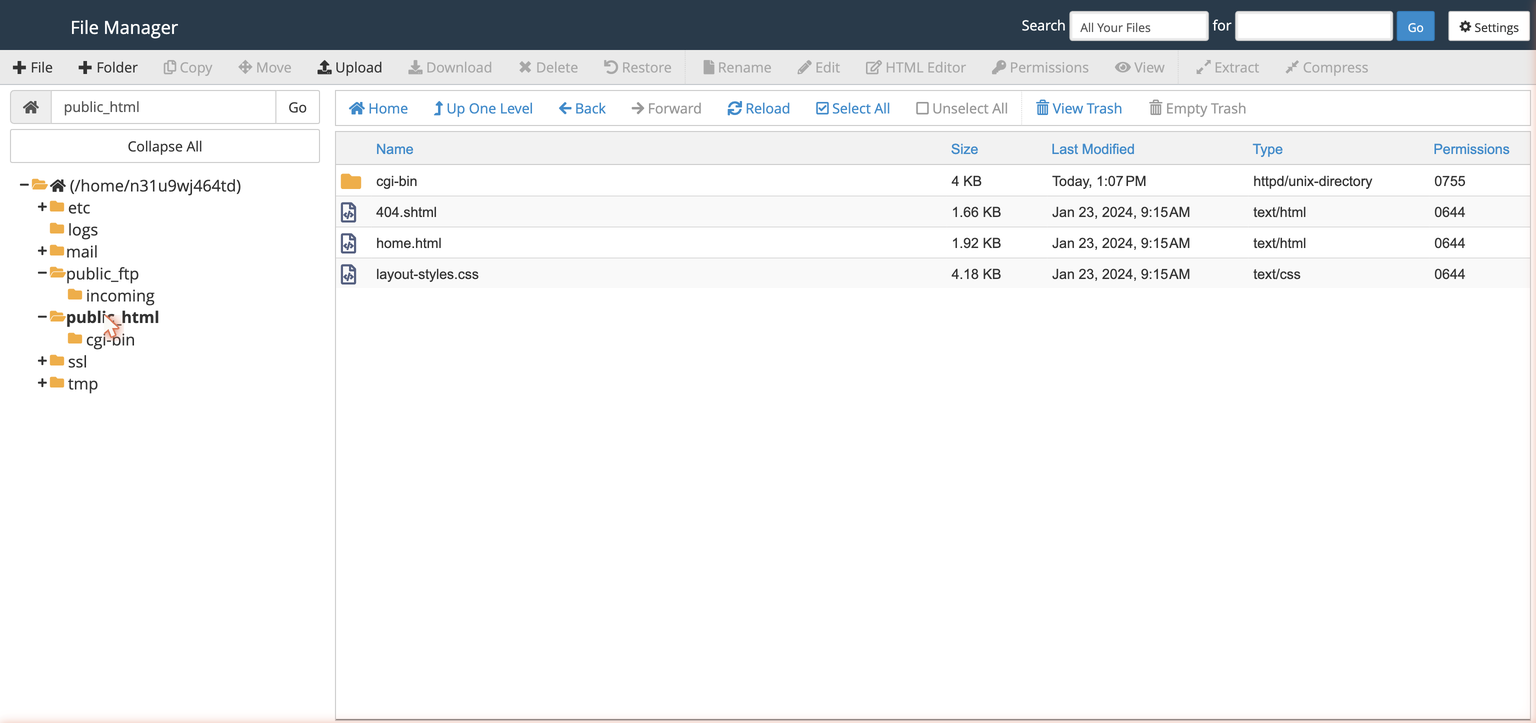
pagemotor.php, a lib folder, and a file called config-sample.php sitting in your site folder. (If extracting gave you a single folder called pagemotor instead, open it, select everything inside, choose Move and move it all into your site folder, then delete the empty folder and the zip.) Good. We use that sample file in step 3.2Create your database
PageMotor keeps your content in a database. Make one in three quick stages.
- In cPanel, open MySQL Databases (under the Databases section).
- Under Create New Database, type a name like
pagemotorand click Create Database. - Scroll to MySQL Users → Add New User. Pick a username, let the password generator make a strong password, and click Create User. Write the password down now.
- Scroll to Add User To Database. Choose your new user and your new database, click Add, then tick ALL PRIVILEGES and Make Changes.
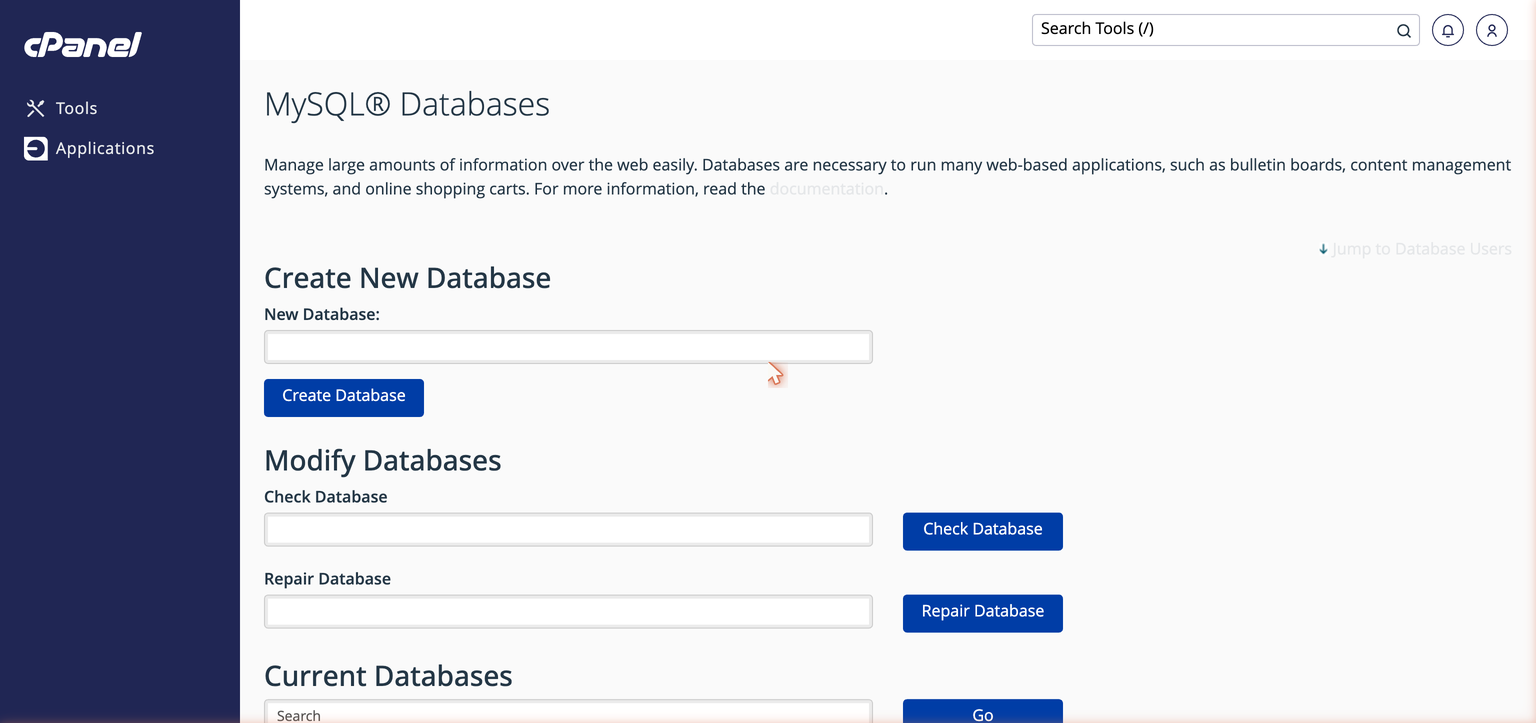
theaccount_ prefix in front of the name field.)pagemotor is saved as something like theaccount_pagemotor, and the user the same way. Copy the full names exactly as cPanel shows them. You will need three things in the next step: the database name, the username, and the password.3Fill in config.php
This is the file that connects PageMotor to the database you just made.
yoursite.com/admin/ in your browser and it asks for the three database values and writes config.php itself. If the wizard appears, use it and jump to step 4. If you get a blank white page instead, that is not an error and nothing is broken: your download simply predates the wizard, so there is nothing at that address to answer you. Carry on with the hand-edit below, which still works on every release.- In File Manager, find
config-sample.phpnext topagemotor.php. - Right-click it and choose Rename. Rename it to exactly
config.php. This rename is the step that switches PageMotor on. - Right-click
config.phpand choose Edit. - Put your three values into
DB_NAME,DB_USERandDB_PASSWORD, using the full prefixed names from step 2. Leave the rest as they are, then Save.
Here is what the database section of your config.php should look like once filled in. Edit the existing lines to match; you are changing three values, not pasting this block in:
// Database connection info:
define('DB_NAME', 'theaccount_pagemotor');   // exact name from cPanel
define('DB_USER', 'theaccount_pmuser');      // exact username from cPanel
define('DB_PASSWORD', 'your-strong-password');
define('DB_HOST', 'localhost');            // correct for Bluehost and most cPanel hosts
define('DB_CHARSET', '');
define('DB_COLLATE', '');
define('DB_TABLE_PREFIX', 'pm_');
define('DB_FLAGS', '');
define('PM_HTML_CHARSET', '');config.php (not config-sample.php, and not config.php.txt), and it must sit in the same folder as pagemotor.php.4Finish in your browser
- Go straight to
yoursite.com/admin/first. On this first visit PageMotor sets up its content and walks you into creating your admin user. Make the admin the first page you open on a brand-new install; current releases expect it, and it never hurts on older ones. - Then visit your website to see the front of the site.
Connecting Claude from this host
PageMotor speaks MCP natively, so once your site is up you can connect Claude Code or Claude.ai to it and let Claude build pages, manage content and run plugins for you. The connection asks a little more of a host than serving pages does. Four things must be true: the Authorization header must reach PHP intact, PageMotor must be allowed to answer its dynamic /.well-known/ routes itself, PHP's clock must be on UTC, and nothing may redirect Claude's POST to /mcp (the trailing-slash trap).
In practice, connecting takes about a minute. In a browser at claude.ai:
- Go to Customize → Connectors (straight there: claude.ai/customize/connectors).
- Click +, then Add custom connector.
- Give it any name you like. For the URL, use your site’s connector address:
https://your-site.com/mcp/, all lower case, trailing slash included. - Click Add. Claude sends you to a sign-in page on your own site. Log in with your PageMotor admin account and approve it.
- Start a new chat, click the + at the lower left of the message box, hover Connectors, and switch yours on.
Then simply talk to it: “what pages do I have”, or “create a contact page”. A free Claude account is enough and allows one custom connector; Pro, Max, Team and Enterprise allow more.
You do not need to test any of those requirements by hand. Install EP Host Check and read its MCP / Claude connection rows: since v1.2.0 its five checks cover all of this from your admin panel, no working Claude connection required, each with a plain fix. If a row fails, or the connection misbehaves anyway, the MCP troubleshooting guide has the exact diagnostic and fix for every verified cause.
Authorization header before PHP ever sees it. The fix is one line in your .htaccess, ready to paste in section 6 of the troubleshooting guide.If something is not working
Open these only if you hit them. Each one is quick.
I see "HTTP ERROR 500" or a blank white page
most commonAlmost always a config.php problem. Check three things:
- The file is named exactly
config.php(not stillconfig-sample.php, and notconfig.php.txt). - It is in the same folder as
pagemotor.php. - To see the real reason, open cPanel → Metrics → Errors, or the
error_logfile in your site folder. If it saysconfig.php"No such file or directory", this is your fix.
The log says "MySQLi Connection Error"
Good news, that means config.php is now working and PageMotor reached the database step. It just could not log in. Re-check, against the exact names cPanel shows:
- The database name and username include your account prefix (the
theaccount_part). - The password is correct.
- The user was added to the database with ALL PRIVILEGES (step 2, last part).
- Rarely, a host keeps databases on a separate server, so
DB_HOSTis notlocalhost. If the three values above are definitely right, check your host's database details page or welcome email, or ask their support, for the correct host name.
I changed my PHP version and nothing changed
The PHP version is rarely the cause. A missing or misnamed config.php fails the same way on every version, so changing it makes no difference. Sort the config.php first. PageMotor is happy on modern PHP 8.x.
I cannot find config-sample.php
It ships inside the PageMotor download, right next to pagemotor.php. Two things to check: the files may have landed in a pagemotor subfolder when the zip extracted, in which case move everything in it up into your site folder (see the note in step 1); and if the folder is genuinely empty, the zip did not extract completely, so repeat step 1.